Pragma Code Review

Pragma includes code review tools so users can inspect changes before accepting them.
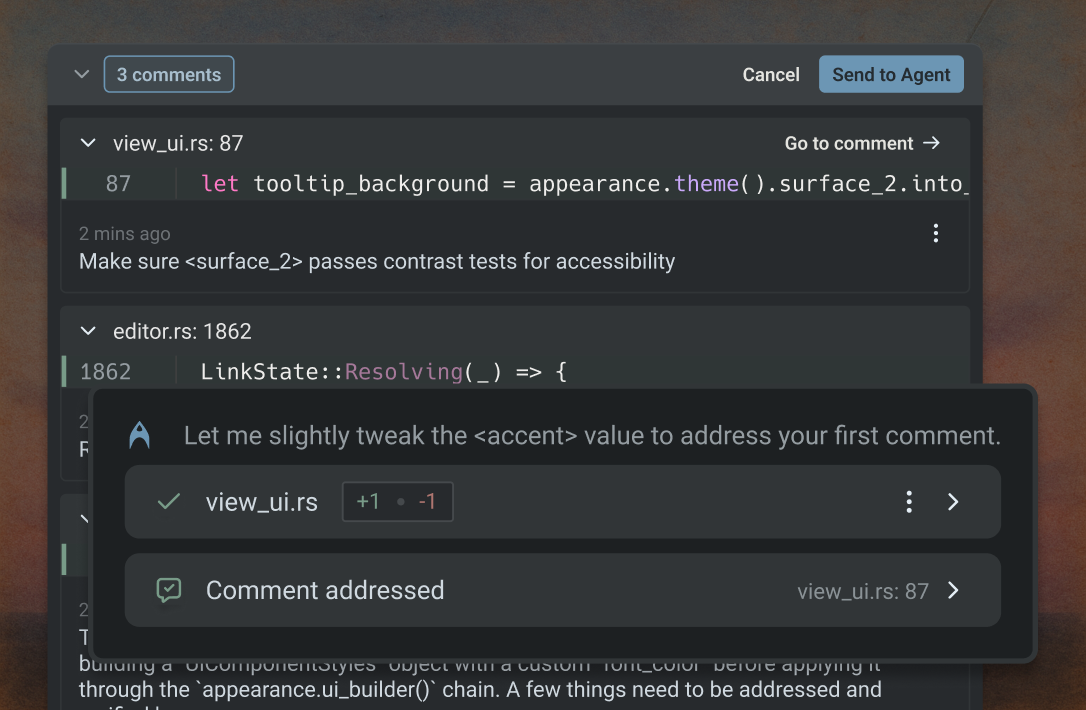
The review experience is designed for developers who want to inspect human edits, AI-generated edits, and Git changes in one place.
What Code Review Is For
Code review helps users:
- Check AI-generated edits.
- Review local changes before committing.
- Compare old and new code.
- Leave comments.
- Ask the agent to explain a diff.
- Catch risky changes before they reach production.
Review Flow
- Make a change manually or with the AI agent.
- Open the review view.
- Inspect changed files.
- Read or add comments.
- Ask the agent to explain uncertain parts.
- Accept, revise, or discard the change.
Reviewing AI Work
Users should not blindly trust AI-generated code. The review view is where they can check:
- Did the agent edit the intended files?
- Did it change unrelated behavior?
- Did it add tests?
- Did it expose secrets?
- Did it change production settings?
Git Integration
The Git dialog helps users understand changes in source control. This is useful before commits, pull requests, releases, or handoff to another developer.
Reviewing Agent Changes
When the AI agent changes files, users should review the proposed diff before accepting it. The code review surface is designed to show changed files, comments, generated edits, and actions such as accepting or refining the work.
Best Practice
For important code, users should combine review with tests:
git diff
npm test
or the equivalent command for the project.